
Android
Download the APK below, then allow "install from unknown sources" when prompted — this is normal for beta apps distributed outside the Play Store.
Download APKInstall Zapya Sync AI on your phone and your computer. The computer keeps the photos and videos you copy over Wi-Fi.
Version 0.7.6Release NotesAll releases
Choose the mobile app you use to send photos and videos to your computer.
Download the APK below, then allow "install from unknown sources" when prompted — this is normal for beta apps distributed outside the Play Store.
Download APKTestFlight beta — coming soon.
iOS distribution requires an App Store Connect / TestFlight setup that isn't live yet. Check back soon.
Your computer stores the full library and runs Zapya Sync AI's local search, organization, and editing tools.
Windows
Windows 10 or higher
(64-bit)
macOS
macOS 11+ on Apple Silicon (or Intel via Rosetta 2)
Linux
Debian/Ubuntu-based distributions (amd64 or arm64)
Install from a terminal in your download folder. This also installs the libraries the app needs:
sudo apt install ./Zapya.Sync.AI_0.7.6_amd64.debsudo apt install ./Zapya.Sync.AI_0.7.6_arm64.debTo remove it later:
sudo apt remove zapya-sync-aiZapya Sync AI uses FFmpeg under LGPLv2.1. Source code: Windows/LinuxmacOS
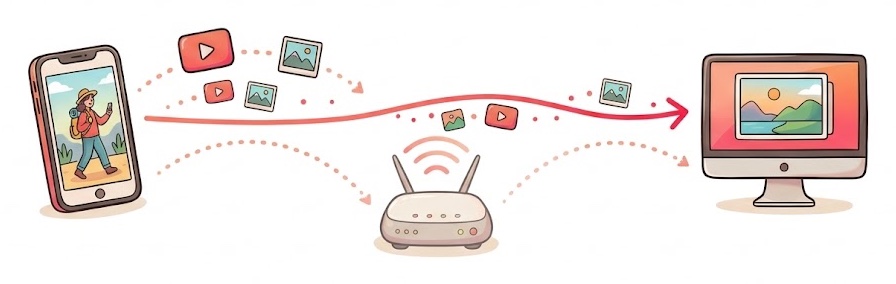
The phone joins the router over Wi-Fi. The computer joins that router over Wi-Fi or a cable. Open Zapya Sync AI on both devices and follow the pairing prompt.